Showing posts with label Basics of Computers. Show all posts
Showing posts with label Basics of Computers. Show all posts
Sunday, June 23, 2013
Basic Computer Terms with Pictures - Pdf Download

Tuesday, June 26, 2012
MS Excel Shortcut Keys
Monday, June 25, 2012
Computer Knowledge / Computer Awareness for Competitive Exams
- Computer Fundamentals - Pdf Download
- Basic Computer Terminology for Beginners (with Pictures) - Pdf Download (new update)
- Computers Basics for Competitive Exams (English Version)- Pdf Downlaod
- Computers Basics for Competitive Exams (Hindi Version) - Pdf Download
- Computer Abbreviations - A Complete List
- Computers Basics in Easy Way (With a Short story)
- Hardware and Software
- Keyboard and it's Keys
- How Does Computer Works?
- MS Word Shortcut Keys
- MS Excel Shortcut Keys
- Generations of Computers
- Compilers
- Computer Networks
- Data Base Management Systems (DBMS)
MS Excel MCQs
Computer Knowledge / Computer Awareness Material for Competitive Exams
Computer Abbreviations - Part 2
HTTP | Hyper Text Transfer Protocol | ||
HW | Hardware | ||
IO | Input Output | ||
IBM | International Business Machines | ||
IC | Integrated Circuit | ||
ICMP | Internet Control Message Protocol | ||
ICS | Reduce Instruction Set Computer | ||
Saturday, June 23, 2012
MS Word - Shortcut Keys
Thursday, February 16, 2012
Computers Basics
 When he turned on the switch, it said YES, he marked it as 1
When he turned off the switch, it said NO, he marked it as 0
He became famous with this YES/NO Device. He added some circuits to it, so that it could perform some calculations. So he called it as Calculator. In-order to make his Ironbox remember calculations, he added some memory to it. And named it as Computer.
He added some Input Devices (Keyboard, Mouse, Scanner, Touch pad, Light-pen, Joystick) to it so that he can talk to it.
He added some Output Devices (Monitor, Speaker, Printer) to it so that the Ironbox can talk to him.
He felt happy because he developed a semi brain called Computer. So, he wanted to communicate with it.
He said "Hi"
It said "1011"
He said "How are you?"
It said "0110 1010 0101"
Then he realized that his Computer only can understand 1's and 0's. So he tried to talk in 1's and 0's language. Later he realized that its really hard to do that. So he attached a compiler to his Computer. The compiler converts his words into 1's and 0's and gives to the computer. And later converts the computer's response into our sooper hero's language.
Our hero felt that he almost Did it. But even our Compiler also cant understand our sooper Hero's language. So he developed some languages (C, C++, Java etc) to talk to the compiler.
So our sooper hero finally managed to build a Computer and Proved that hez a Brainless Brilliant.
How does Computer Work ?
The Keyboard
How does Computer Work?
- Input Devices :
- Keybord : To type the data
- Mouse : To point and click the objects
- Tracker Ball : Works similar to mouse, used by Graphic Designers
- Scanners : Converts the Hardcopy into Softcopy (Simply scans paper documents and stores them in system)
- Touchpad : The desktop which responds according to the Touch.
- Light pens : Used to point the areas on the screen.
- Joy Sticks : Used for Playing Videogames.
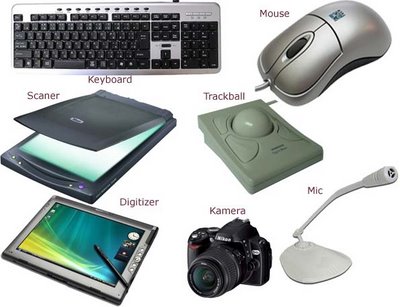
| Input Devices |
- Output : Data / Information given by the computer. It displays on Monitor (Screen) / Prints via Printer / Generates sounds via Sound boxes and ofcourse stores the information in Disks.
- Output Devices :
- VDU : Video Display Unit. Also known as Monitor. Which displays output
- Printers : There are many types of printers. These are used for converting the Soft-copy into Hard-copy (Printing the data on Paper)
- Plotter : It is also similar to printer, but it can draw continuous point-to-point lines directly from vector graphics files or commands. So you can expect more clarity than printers.
- Speakers : Gives the output in the Sound Signal form
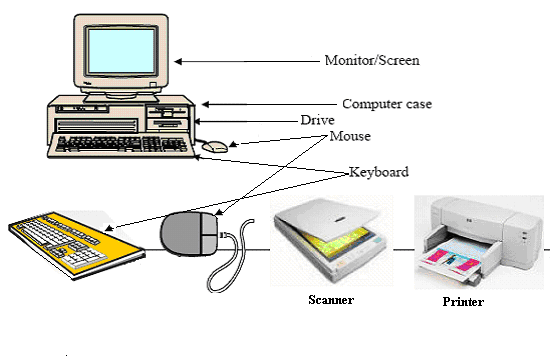
- Processing : The Processor/Central Processing Unit/CPU performs the operations with the help of ALU (Arithmetic Logic Unit - which performs Mathematical and Logical Operations)
- Storage : The Random Access Memory (RAM) or Memory temporarily stores your date while you are working with that.
- Storage Devices :
- Hard Disk : Internal Drive of High capacity which stores larger and important files including your Operating System.
- The speed of the Hard disk is measured in milliseconds,
- The capacity of the Hard Disk is measured in Giga Bytes (GB). You can get harddisks of 40-80GB now a days.
- A Giga Byte is equalent to 1024 Mega Bytes (MB)
- Floppy Disk : Its helps you to store smaller amount of data and take
- It's speed is Very Very low.
- Capacity normally 1.44 Mega Bytes (hardly you can store 6 or 7 wallpapers :P)
- CD/CD ROM :
- Slower than Hard Disks and Faster than Floppy Disks
- Capacity 650+MB
- DVD :
- Slower than HardDisks but faster than CDs
- Capacity upto 17Giga Bytes


Subscribe to:
Posts (Atom)